Using OmniFocus

OmniFocus is the task manager I recommend for macOS and iOS. Here's how to get the most out of it.

How to Keep Errands to a Minimum

Getting things done around town takes extra planning

Errands are a necessary part of a productive week, but the time you spend running around town can add up. Here are nine ways to help keep the overhead of running errands to a minimum so you can stay productive.
4:05 read (813 words)

The Forecast View in OmniFocus 2 for OS X

Because you don’t do everything at once

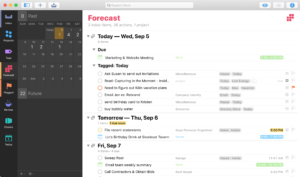
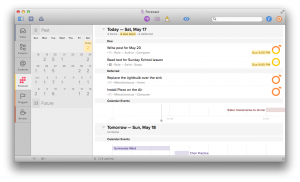
The Forecast view lets you schedule tasks and see when you’re overbooked. OmniFocus 2 for OS X brings this powerful tool to the Mac.

2:55 read (585 words)

How to Automatically Flag Starting Tasks in OmniFocus

Bring Scheduled Tasks to Your Attention, Right on Time

Using deferred dates is the best way to schedule a task for a later date. With a little bit of scripting, you can have them automatically show up in your list of what you’re going to do today.

3:15 read (647 words)

Tracking Urgent and Important Tasks in OmniFocus

How to see the Quadrant 1 & 2 tasks that need your attention

Ideally, we spend most of our time working in Quadrant 2, doing important work early, while you still have time to do quality work. OmniFocus lets you track that important work while making sure that deadlines don’t slip by.

4:40 read (928 words)

Why You Should Write Down What You Need to Do

Your head is a terrible place to keep your task list

Keeping your task list in your head is a recipe for stress, failure, and forgotten commitments. Write it down if you want to get it done.

2:40 read (539 words)

An OmniFocus Create Task Bookmarklet

Create a task with the current URL

I often find myself needing to come back to a page later. I used to just leave the page open in another tab, but that can quickly get out of hand. Then I tried adding the pages to Pocket, but they would get lost with the articles I just wanted to read later. I wanted […]

2:40 read (533 words)

8 Tips and Tools for Forgetful Productivity

Get more done and think less about it

Forgetting is good as long as you remember at the right time. Here are eight tips to free up your brain until it’s time to get things done.

3:25 read (686 words)

Setting Up Siri with OmniFocus

Tell Your Digital Assistant Where to File Your Tasks

Apple’s voice-activated assistant can schedule appointments, take a note, and add tasks to OmniFocus. Here’s how to set it up.

3:00 read (607 words)

Create OmniFocus Project Templates with AppleScript

Improve Your Project Management by Automatically Customizing New Projects

With a little bit of AppleScript, you can create unique repeating tasks in OmniFocus that you can tell apart.

7:35 read (1,521 words)